seamless texture generator

Seamless Texture Generator

Generate tileable, seamless textures for backgrounds and terrain. Check that each edge repeats cleanly before you drop it into a scene.

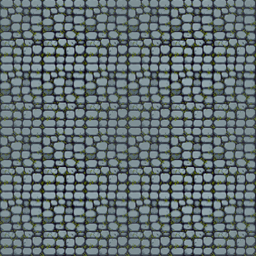
2×2 seamless wrap check · 256×256
ZERO-SEAM EDGE WRAP VERIFIED
Generate workbenchTileable · edge check · prompt-to-texture

Generate a tileable texture

Describe a surface; the studio renders a repeating texture.

  • Describe a surface for a prompt-to-texture pass
  • Preview a 2×2 tiling to spot seams
  • Export a clean, repeating PNG
Interactive AI Prompt & Sprite Sheet SandboxPreview real outputs before signing up
Action
Speed
Frames
Single Tile (256px)
256x256 seamless dungeon cobblestone tile
2×2 Tiled Seam Verification Preview

Step by step

How it works..

Step 011
"dungeon cobble"

Describe a surface

Name the material, style, and palette you want the texture to carry.

Step 022
Generated tileable stone sample

Generate the tile

The studio renders a texture built to repeat on every edge.

Step 033
2×2 OK

Check the tiling

Preview a 2×2 grid and confirm there is no visible seam.

Supported Inputs

MP4, MOV, WebM (≤15s 1080p) · Animated GIF · PNG, WebP, JPG (≤240 frames)

Native Engine Exports

PNG Atlas + manifest.json · Godot 4 .tres · Phaser 3 JSON · Unity .meta · Aseprite · FNF XML

Anti-Jitter Alignment

Bottom-Baseline Foot Lock · BBox Center Anchor · Chroma Key & Edge De-Spill

Free Trial + Local Tools

90 free credits after verified signup (~3 sets). Packing, slicing & animating stay 100% free locally.

Standard manifest.json Frame Layout Schema

Download free sample PNG + manifest.json →

Every export includes a clean PNG atlas plus a machine-readable manifest.json (alongside one-click Godot .tres, Phaser 3 JSON, Unity .meta, Aseprite JSON, and FNF XML):

character.manifest.jsonjson
{
  "characterId": "knight",
  "sprite_sheet_alpha": "knight.png",
  "cell": { "width": 387, "height": 460, "safe_margin_x": 6, "safe_margin_y": 6 },
  "animation": {
    "cellWidth": 387,
    "cellHeight": 460,
    "columns": 25,
    "rows": {
      "walk": { "row": 0, "frames": 25, "fps": 12, "loop": true }
    }
  },
  "frame_layout": {
    "sheetWidth": 9675,
    "sheetHeight": 460,
    "cellWidth": 387,
    "cellHeight": 460,
    "rows": {
      "walk": [
        { "x": 0, "y": 0, "w": 387, "h": 460 },
        { "x": 387, "y": 0, "w": 387, "h": 460 }
      ]
    }
  }
}
All coordinates are integer pixel rectangles from the top-left corner of the PNG atlas — zero floating-point UV rounding drift.

What Makes a Texture Truly Seamless

A seamless texture matches on opposite edges. When you tile it, the left edge flows into the right and the top into the bottom without a line.

Many texture generators ignore that and return a pretty but non-repeating image. This tool is built around the tiling check first.

Preview the tile in a 2×2 grid before export. If a seam shows, adjust the prompt toward simpler, centred detail.

Tileable Textures for Terrain and Backgrounds

Terrain and backgrounds repeat across large areas, so seams multiply. A single bad edge becomes a visible grid across the whole scene.

Generate textures for grass, stone, water, or brick, then verify each on the tiling preview. Keep the detail evenly distributed.

Because output is a flat PNG, it drops into any engine or paint tool. Scale it and the repeat stays intact.

Seamless Pattern Generator Tips

Ask for an even, centred pattern. Busy corners are the usual cause of visible seams when a texture repeats.

Export at a power-of-two size where possible. Many engines prefer it, and scaling stays crisp.

Seamless Textures for 3D, Tilemaps, and Parallax

The same tile has to survive very different repeat scales. A 2×2 preview catches the obvious seam, but a parallax background layers the texture at several depths and scroll speeds, so an edge that looks fine once can shimmer when it repeats ten times across a wide scene.

Check the texture at the resolution it will actually appear. Downscaled by the camera, high-contrast detail aliases into a moiré pattern; oversized detail reads as a flat colour from far away. Even, mid-frequency detail holds up at more than one zoom level.

For tilemaps the tile must also sit beside its own rotated and mirrored copies. Detail that is symmetric and lacks an obvious 'top' avoids the tell-tale T-junctions where four tiles meet, which is the seam players notice first on a floor.

Finally, keep the palette coherent across a whole tileset. A grass tile, a flower overlay and a dirt path should read as one world, so generate them from the same style prompt and check them side by side before wiring them into a scene rather than sampling each in isolation.

FAQ

Frequently asked questions.

What does seamless mean here?+
Opposite edges match, so the texture repeats without a visible line. The tool checks this with a 2×2 tiling preview before export.
Can I use the texture in any engine?+
Yes. The output is a flat PNG that tiles cleanly. Import it into Unity, Godot, GameMaker, or any paint or 3D tool.
How do I avoid visible seams?+
Keep the detail even and avoid heavy contrast at the edges. Preview the tiling and adjust the prompt if a seam appears.
Does generation cost credits?+
Yes. The AI generation step spends credits per texture. Previewing a tiling after generation is free.
What texture types can I generate?+
Grass, stone, brick, sand, water, wood and similar surfaces all work well. Describe the material, style and palette, then verify the tiling preview before exporting.
What size should the seamless texture be?+
Power-of-two sizes (256, 512, 1024) tile cleanly and load fast in most engines. Keep the detail even so it holds up when the camera scales it up or down.