pixel font generator

Pixel Font Generator

Preview and export pixel-perfect bitmap fonts for retro game UI. Tune the grid and spacing, then export a sheet with consistent baselines.

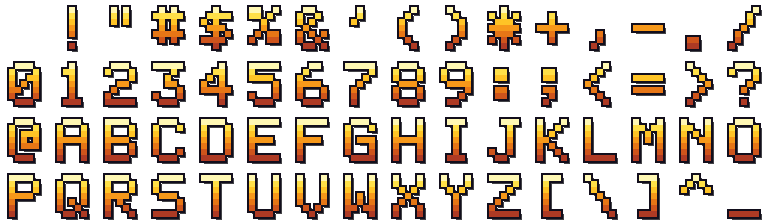
arcade gold 16 · 64 glyph atlas + coords
Arcade Gold bitmap pixel font 16x4 glyph atlas
Generate workbenchBitmap glyphs · baseline grid · sheet export

Build a pixel bitmap font

Choose a glyph set; preview and export a bitmap font sheet.

  • Preview glyphs on a consistent pixel grid
  • Tune spacing and baseline alignment
  • Export a bitmap sheet for game UI
Interactive AI Prompt & Sprite Sheet SandboxPreview real outputs before signing up
Action
Speed
Frames
Bitmap Font Style
A B C16×4 · 64 GLYPHS
Exported Glyph Atlas (768×224 · Baseline Aligned)
Arcade Gold bitmap pixel font atlas PNG

Step by step

How it works..

Step 011
ABC9HP!?

Pick a glyph set

Choose the characters your retro UI needs to render.

Step 022
Pixel bitmap glyph sheet

Tune the grid

Adjust pixel size, spacing, and baseline until text reads cleanly.

Step 033
glyphs.png + metrics.json

Export the sheet

Download a bitmap font sheet plus the glyph coordinates.

Supported Inputs

MP4, MOV, WebM (≤15s 1080p) · Animated GIF · PNG, WebP, JPG (≤240 frames)

Native Engine Exports

PNG Atlas + manifest.json · Godot 4 .tres · Phaser 3 JSON · Unity .meta · Aseprite · FNF XML

Anti-Jitter Alignment

Bottom-Baseline Foot Lock · BBox Center Anchor · Chroma Key & Edge De-Spill

Free Trial + Local Tools

90 free credits after verified signup (~3 sets). Packing, slicing & animating stay 100% free locally.

Standard manifest.json Frame Layout Schema

Download free sample PNG + manifest.json →

Every export includes a clean PNG atlas plus a machine-readable manifest.json (alongside one-click Godot .tres, Phaser 3 JSON, Unity .meta, Aseprite JSON, and FNF XML):

character.manifest.jsonjson
{
  "characterId": "knight",
  "sprite_sheet_alpha": "knight.png",
  "cell": { "width": 387, "height": 460, "safe_margin_x": 6, "safe_margin_y": 6 },
  "animation": {
    "cellWidth": 387,
    "cellHeight": 460,
    "columns": 25,
    "rows": {
      "walk": { "row": 0, "frames": 25, "fps": 12, "loop": true }
    }
  },
  "frame_layout": {
    "sheetWidth": 9675,
    "sheetHeight": 460,
    "cellWidth": 387,
    "cellHeight": 460,
    "rows": {
      "walk": [
        { "x": 0, "y": 0, "w": 387, "h": 460 },
        { "x": 387, "y": 0, "w": 387, "h": 460 }
      ]
    }
  }
}
All coordinates are integer pixel rectangles from the top-left corner of the PNG atlas — zero floating-point UV rounding drift.

A Pixel Font Generator for Retro UI

Retro interfaces need fonts that align to a pixel grid. Anti-aliasing ruins the look, so every glyph must land on whole pixels.

This tool previews a bitmap font on a fixed grid. You set the size and spacing, and the preview shows exactly how text will render.

When the grid is right, export a sheet with glyph coordinates. Your UI code blits each glyph from the sheet in order.

Bitmap Fonts with Consistent Baselines

Inconsistent baselines make text look crooked. Mixed letter heights jump around when lines stack. A shared baseline fixes that.

Tune the baseline once and every glyph inherits it. Descenders and capitals then sit where your layout expects them.

Export the coordinates alongside the sheet, so the engine knows each glyph's rectangle without guessing.

Pixel Art Font Export for Any Engine

The output is a plain bitmap sheet, not an installed font file. That suits engines that draw text from a texture atlas.

Because glyphs are whole pixels, the text stays crisp at any integer scale. Avoid fractional scaling, which reintroduces blur.

Bitmap Fonts, Glyph Sheets, and Kerning

A bitmap font is a texture atlas of glyphs plus the rectangle for each one. That simplicity is the point: the renderer does no font shaping, it blits a quad per character, so it works the same on a tiny embedded target and in a full engine.

The two numbers that make or break readable text are the baseline and the advance width. Set the baseline once so descenders (g, p, y) and capitals share a line, and keep a fixed advance per glyph unless you measure each one — otherwise the spacing looks accidentally cramped or loose.

For a monospaced retro look, give every glyph the same cell width including a little right-side padding so characters never touch. Export the coordinates with the sheet and the UI code can draw each glyph by index without re-measuring anything.

FAQ

Frequently asked questions.

Is this a downloadable font file?+
It exports a bitmap sheet plus glyph coordinates, not an installed TTF. That is what engines drawing from a texture atlas need.
Can I choose which characters to include?+
Yes. Pick the glyph set your UI needs, from basic letters and digits to punctuation, so the sheet stays compact.
How do I keep text crisp?+
Export at whole-pixel sizes and scale by integer factors only. Fractional scaling reintroduces the blur you removed.
Does generating a font cost credits?+
The AI generation step spends credits. Previewing and exporting a bitmap sheet from an existing set does not.
Can I use the exported sheet for a monospaced font?+
Yes. Give every glyph the same cell width, including a little right-side padding, and the sheet renders as evenly spaced monospaced text.
How do I handle descenders and spacing?+
Set one shared baseline so g, p and y hang below it by the same amount, and keep a fixed advance width per glyph. Export the coordinates so the renderer never has to re-measure.